Patterns
Common workflow patterns with complete examples.
Sequential Pipeline

The simplest pattern. Tasks run one after another. Each task depends on the previous one.
{
  "tasks": [
    {
      "id": "build",
      "executor": "shell",
      "config": { "command": "make build" }
    },
    {
      "id": "test",
      "executor": "shell",
      "config": { "command": "make test" },
      "depends_on": ["build"]
    },
    {
      "id": "deploy",
      "executor": "shell",
      "config": { "command": "make deploy" },
      "depends_on": ["test"]
    }
  ]
}
Fan-Out / Fan-In
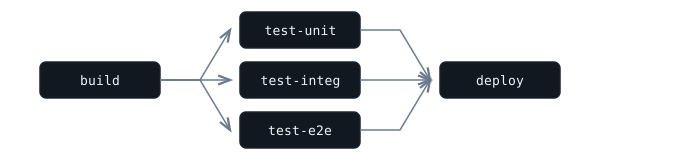
Multiple tasks run in parallel, then a single task aggregates. The fan-out tasks share a common dependency; the fan-in task depends on all of them.
{
  "tasks": [
    {
      "id": "build",
      "executor": "shell",
      "config": { "command": "make" }
    },
    {
      "id": "test-unit",
      "executor": "shell",
      "config": { "command": "make test-unit" },
      "depends_on": ["build"]
    },
    {
      "id": "test-integ",
      "executor": "shell",
      "config": { "command": "make test-integ" },
      "depends_on": ["build"]
    },
    {
      "id": "test-e2e",
      "executor": "shell",
      "config": { "command": "make test-e2e" },
      "depends_on": ["build"]
    },
    {
      "id": "deploy",
      "executor": "shell",
      "config": { "command": "make deploy" },
      "depends_on": ["test-unit", "test-integ", "test-e2e"]
    }
  ]
}
Approval Gate

Pause for human approval before proceeding. The approval executor blocks until someone approves or rejects.
{
  "tasks": [
    {
      "id": "build",
      "executor": "shell",
      "config": { "command": "make build" }
    },
    {
      "id": "approve",
      "executor": "approval",
      "config": { "message": "Deploy to production?" },
      "depends_on": ["build"]
    },
    {
      "id": "deploy",
      "executor": "shell",
      "config": { "command": "make deploy" },
      "depends_on": ["approve"]
    }
  ]
}
Timed Delay

Wait between stages -- useful for DNS propagation, cache invalidation, or rate-pacing.
{
  "id": "wait-for-dns",
  "executor": "delay",
  "config": { "seconds": 60 },
  "depends_on": ["update-dns"]
}
Dynamic Fan-Out (Map-Reduce)
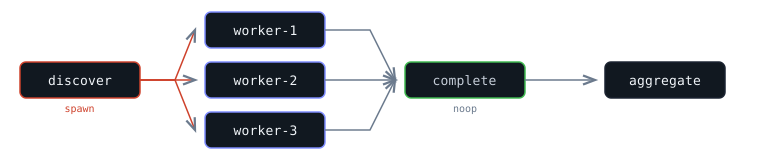
Discover work at runtime, process each item in parallel, then aggregate results. The spawn executor runs a command that outputs task definitions as JSON.
{
  "tasks": [
    {
      "id": "discover",
      "executor": "spawn",
      "config": { "command": "./list-items.sh" },
      "spawn_output": ["complete"]
    },
    {
      "id": "aggregate",
      "executor": "shell",
      "config": { "command": "./aggregate.sh" },
      "depends_on": ["discover/complete"]
    }
  ]
}
Where ./list-items.sh outputs:
[
  {
    "id": "process-1",
    "executor": "shell",
    "config": { "command": "./process.sh item-1" }
  },
  {
    "id": "process-2",
    "executor": "shell",
    "config": { "command": "./process.sh item-2" }
  },
  {
    "id": "process-3",
    "executor": "shell",
    "config": { "command": "./process.sh item-3" }
  },
  {
    "id": "complete",
    "executor": "noop",
    "depends_on": ["process-1", "process-2", "process-3"]
  }
]
The discover task runs first and outputs 3 processing tasks plus a noop barrier (complete). The barrier depends on all processing tasks, so it only succeeds when all items are done. The aggregate task waits for the barrier via discover/complete.
Conditional Execution
Skip tasks at runtime based on the output of earlier tasks. The condition field accepts a Rhai expression with task outputs injected as native scope variables. If the result is false, the task is skipped and its dependents proceed normally.
tasks.detect.output.stdout), not the ${...} syntax used in executor config fields. Hyphenated task IDs need bracket notation: tasks["my-task"].output.result.
{
  "tasks": [
    {
      "id": "detect",
      "executor": "shell",
      "config": { "command": "git diff --name-only HEAD~1" }
    },
    {
      "id": "build-frontend",
      "executor": "shell",
      "config": { "command": "npm run build" },
      "depends_on": ["detect"],
      "condition": "tasks.detect.output.stdout.contains(\"frontend/\")"
    },
    {
      "id": "build-backend",
      "executor": "shell",
      "config": { "command": "cargo build" },
      "depends_on": ["detect"],
      "condition": "tasks.detect.output.stdout.contains(\"backend/\")"
    }
  ]
}
The detect task lists changed files. Each build step checks whether its directory was modified. Unchanged components are skipped entirely — no wasted compute, no need for a separate spawn script. See Flows → Conditions for the full reference.
Monorepo: Build Only What Changed
Use spawn to detect changed packages and generate build tasks only for those that need it.
{
  "id": "detect-changes",
  "executor": "spawn",
  "config": { "command": "./detect-changes.sh" },
  "spawn_output": ["all-built"]
}
The detect-changes.sh script runs git diff, identifies changed packages, and generates build tasks only for those packages. Unchanged packages are skipped entirely -- no wasted compute.
Matrix Expansion
Generate test tasks for every combination of platform, runtime version, or configuration.
{
  "id": "matrix",
  "executor": "spawn",
  "config": { "command": "./generate-matrix.sh" },
  "spawn_output": ["all-passed"]
}
The script generates tasks like test-node18-ubuntu, test-node20-ubuntu, test-node18-alpine, etc. -- one task per combination. A noop barrier (all-passed) depends on all of them.
Data-Driven Pipeline
Query an API or database, then generate one task per record. The shell shorthand pipes results through a script:
{
  "id": "fetch-records",
  "executor": "spawn",
  "config": { "command": "curl -s https://api.example.com/records | python3 generate_tasks.py" },
  "spawn_output": ["all-processed"]
}
If the API already returns task definitions directly, use the HTTP inner executor instead:
{
  "id": "fetch-records",
  "executor": "spawn",
  "config": {
    "executor": "http",
    "config": {
      "url": "https://api.example.com/tasks",
      "method": "GET"
    }
  },
  "spawn_output": ["all-processed"]
}
The shell version pipes API results into a script that generates one processing task per record. The HTTP version expects the API to return a JSON array of task definitions directly. Both are useful for ETL workflows, batch processing, or any scenario where the input set is external.
Multi-Output Pipeline
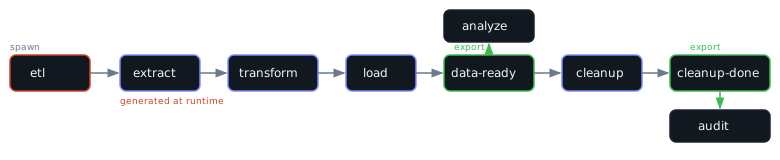
A spawn task can export multiple milestones. Different downstream tasks depend on different outputs, so they start at different stages of the generated pipeline.
{
  "tasks": [
    {
      "id": "etl",
      "executor": "spawn",
      "config": { "command": "./generate-etl.sh" },
      "spawn_output": ["data-ready", "cleanup-done"]
    },
    {
      "id": "analyze",
      "executor": "shell",
      "config": { "command": "./analyze.sh" },
      "depends_on": ["etl/data-ready"]
    },
    {
      "id": "audit",
      "executor": "shell",
      "config": { "command": "./audit-cleanup.sh" },
      "depends_on": ["etl/cleanup-done"]
    }
  ]
}
The generated ETL pipeline has two milestones: data-ready fires after the load step, cleanup-done fires after cleanup. analyze starts as soon as data is loaded, without waiting for cleanup. audit runs only after cleanup finishes. The two downstream tasks run at different stages of the generated pipeline.
The generated output from ./generate-etl.sh:
[
  { "id": "extract", "executor": "shell", "config": { "command": "./extract.sh" } },
  { "id": "transform", "executor": "shell", "config": { "command": "./transform.sh" }, "depends_on": ["extract"] },
  { "id": "load", "executor": "shell", "config": { "command": "./load.sh" }, "depends_on": ["transform"] },
  { "id": "data-ready", "executor": "noop", "depends_on": ["load"] },
  { "id": "cleanup", "executor": "shell", "config": { "command": "./cleanup.sh" }, "depends_on": ["data-ready"] },
  { "id": "cleanup-done", "executor": "noop", "depends_on": ["cleanup"] }
]
Build Artifacts
Pass files between tasks using the artifact storage. The build step compiles and stores the binary; the deploy step retrieves it. Artifacts are scoped to the flow and cleaned up automatically when it completes.
{
  "tasks": [
    {
      "id": "build",
      "executor": "shell",
      "config": { "command": "cargo build --release && cp target/release/myapp $TASKED_ARTIFACTS/myapp" }
    },
    {
      "id": "test",
      "executor": "shell",
      "config": { "command": "$TASKED_ARTIFACTS/myapp --self-test" },
      "depends_on": ["build"]
    },
    {
      "id": "deploy",
      "executor": "shell",
      "config": { "command": "scp $TASKED_ARTIFACTS/myapp server:/opt/myapp && ssh server systemctl restart myapp" },
      "depends_on": ["test"]
    }
  ]
}
Shell tasks use $TASKED_ARTIFACTS (a local directory path). Container tasks use the HTTP API at $TASKED_ARTIFACT_URL instead — upload with curl -X PUT --data-binary @file $TASKED_ARTIFACT_URL/name, download with curl $TASKED_ARTIFACT_URL/name. See Flows → Artifacts for the full reference.
Containerized Execution

Run tasks in isolated Docker containers for reproducibility and environment isolation.
{
  "id": "run-tests",
  "executor": "container",
  "config": {
    "image": "node:20-slim",
    "command": ["npm", "test"],
    "env": { "CI": "true" }
  }
}
AI Agent in the Loop

Use an AI agent as a pipeline step -- for code review, test analysis, report generation, or decision-making.
{
  "id": "review",
  "executor": "agent",
  "config": {
    "provider": "claude",
    "prompt": "Review the test results and summarize failures",
    "env": { "ANTHROPIC_API_KEY": "${secrets.ANTHROPIC_API_KEY}" }
  },
  "depends_on": ["run-tests"]
}
Multi-Stage with Recursive Spawn
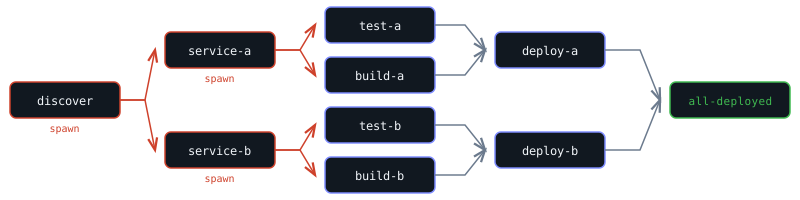
A spawn task can generate tasks that are themselves spawn executors, enabling multi-level dynamic expansion.
{
  "id": "discover-services",
  "executor": "spawn",
  "config": { "command": "./list-services.sh" },
  "spawn_output": ["all-deployed"]
}
Each generated service task is itself a spawn that generates test, build, and deploy steps for that service. The first spawn discovers what to work on; each second-level spawn discovers how to process it. This is useful for monorepo deployments, multi-tenant processing, or any hierarchical workflow.
Sub-Flow Composition
Use the trigger executor to submit child flows to other queues. This is useful when different stages of a pipeline need different execution policies (concurrency, retries, rate limits), or when you want to reuse a flow definition across multiple parent workflows.
Build, then trigger a deploy flow on a separate queue:
{
  "tasks": [
    {
      "id": "build",
      "executor": "shell",
      "config": { "command": "make build" }
    },
    {
      "id": "deploy",
      "executor": "trigger",
      "config": {
        "queue": "deploy-queue",
        "flow": {
          "tasks": [
            { "id": "push", "executor": "shell", "config": { "command": "./deploy.sh" } },
            { "id": "verify", "executor": "http", "config": { "url": "https://health.example.com" }, "depends_on": ["push"] }
          ]
        }
      },
      "depends_on": ["build"]
    }
  ]
}
Dynamic sub-flow — let an upstream task produce the flow definition, then trigger it:
{
  "tasks": [
    {
      "id": "plan",
      "executor": "shell",
      "config": { "command": "./generate-deploy-plan.sh" }
    },
    {
      "id": "execute",
      "executor": "trigger",
      "config": {
        "queue": "workers",
        "flow": "${tasks.plan.output.flow_def}"
      },
      "depends_on": ["plan"]
    }
  ]
}
Fire-and-forget — trigger a notification flow without blocking the parent:
{
  "tasks": [
    {
      "id": "deploy",
      "executor": "shell",
      "config": { "command": "make deploy" }
    },
    {
      "id": "notify",
      "executor": "trigger",
      "config": {
        "queue": "notifications",
        "flow": {
          "tasks": [{ "id": "send", "executor": "http", "config": { "url": "https://hooks.slack.com/services/T00/B00/xxx" } }]
        },
        "wait": false
      },
      "depends_on": ["deploy"]
    }
  ]
}
Use trigger instead of spawn when you want the child work to run as a separate flow with its own queue policies, or when you need the isolation of independent flow lifecycles.