Concepts
How tasks, flows, queues, and executors fit together.
How It All Fits Together
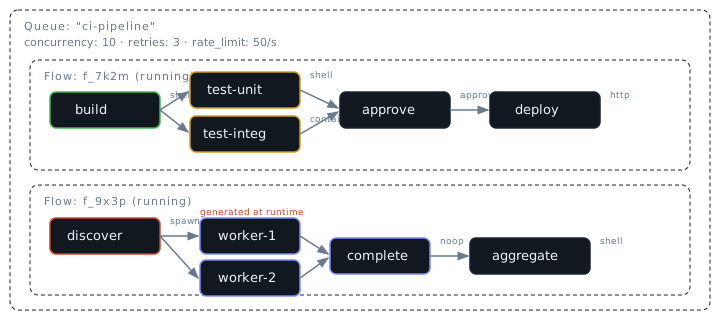
A queue is an execution context with policies: concurrency limits, rate limiting, retries. You create one or more queues to organize your workloads.
A flow is a group of tasks submitted to a queue. Each flow is independent — it runs to completion (or failure) on its own. A queue can have many flows running at the same time.
A task is a single unit of work inside a flow. Tasks declare dependencies on other tasks. Tasked runs tasks in the right order, executing independent tasks in parallel.
An executor defines how a task runs: as a shell command, an HTTP request, a Docker container, an AI agent prompt, or several other types. Each task names its executor and provides config for it.
The diagram above shows a queue with two flows. The first flow has a build/test/approve/deploy pipeline using four different executors. The second flow uses a spawn executor to generate workers at runtime.
Tasks and Dependencies
A task is a single unit of work: run a shell command, make an HTTP request, or wait for an external callback. Tasks can depend on other tasks. When task B depends on task A, Tasked waits for A to finish before starting B.
You describe what needs to happen and what depends on what. Tasked figures out the order and runs independent work in parallel.
  build ─────→ test-unit ──→ deploy
            └→ test-integ ─┘
In this example, build runs first. Once it finishes, test-unit and test-integ start at the same time (they're independent). deploy waits for both tests to pass.
You express this by listing each task's dependencies:
{
  "tasks": [
    { "id": "build",      "depends_on": [] },
    { "id": "test-unit",  "depends_on": ["build"] },
    { "id": "test-integ", "depends_on": ["build"] },
    { "id": "deploy",     "depends_on": ["test-unit", "test-integ"] }
  ]
}
The technical term for this structure is a directed acyclic graph (DAG). Directed because dependencies go one way. Acyclic because circular dependencies aren't allowed. If A depends on B and B depends on A, Tasked rejects it at submission time.
Flows
A flow is a DAG of tasks submitted as a single unit. When you call tasked run flow.json or POST to the API, you are submitting a flow.
- A flow succeeds when all tasks reach the
succeededstate. - A flow fails when any task fails terminally (after all retries are exhausted).
- Cancelling a flow cancels all non-terminal tasks. Child flows spawned by trigger tasks are also cancelled recursively.
- Set
fail_fastto cancel all tasks on first failure instead of only downstream dependents.
Flow states:
| State | Meaning |
|---|---|
running |
Actively executing tasks |
succeeded |
All tasks completed successfully |
failed |
One or more tasks failed terminally |
cancelled |
Flow was explicitly cancelled |
Flows can optionally include webhooks for receiving HTTP notifications when the flow succeeds or fails.
Tasks within a flow can share files through artifacts — a temporary storage area scoped to the flow. Shell tasks write to $TASKED_ARTIFACTS directly; container tasks use the HTTP API at $TASKED_ARTIFACT_URL. Artifacts are cleaned up when the flow completes. See Flows → Artifacts for details.
See the Flows page for the full flow definition reference.
Tasks
A task is a single unit of work: a shell command, an HTTP request, or a callback. Each task has an executor, optional configuration, and moves through a state machine as it executes.
Task state machine
  pending ──→ ready ──→ running ──→ succeeded
                │          │
                │          ├──→ failed
                │          │
                │          └──→ delayed ──→ ready  (retry loop)
                │
└──→ cancelled| State | Meaning |
|---|---|
pending |
Waiting for dependencies to complete |
ready |
Dependencies met, queued for dispatch |
running |
Currently executing |
succeeded |
Completed successfully (output stored) |
failed |
All retries exhausted |
delayed |
Waiting for retry backoff timer |
cancelled |
Cascade from failed dependency or flow cancellation |
Terminal states are succeeded, failed, and cancelled. Once a task reaches a terminal state it never changes again.
Tasks can also carry a condition — a Rhai expression evaluated at dispatch time. Task outputs and secrets are injected as native scope variables (e.g., tasks.check.output.exit_code == 0). If the condition evaluates to false, the task is skipped and its dependents proceed normally. See Flows → Conditions for the full reference.
Executors
An executor defines how a task runs. Every task must specify one.
| Executor | Description |
|---|---|
shell |
Runs a shell command. Output captures stdout, stderr, and exit code. |
http |
Makes an HTTP request. Output captures status and body. |
callback |
Pauses until an external system reports completion via the API. |
noop |
Completes immediately. Useful for fan-in synchronization points. |
delay |
In-process timed delay. Useful for rate-pacing between stages. |
approval |
Pauses until a human approves or rejects. Supports CLI prompts, auto-approve, and remote ack. |
container |
Runs tasks in Docker containers. Provides full isolation and reproducibility. |
agent |
Runs AI model prompts in provider-specific Docker containers (Claude, OpenAI, Gemini). |
spawn |
Runs a command and parses its stdout as task definitions, enabling dynamic fan-out workflows. |
trigger |
Submits a child flow to a queue. Optionally waits for completion, enabling sub-flow composition. |
See the Executors page for full configuration details and examples.
Variable Substitution
Tasks can reference the output of their dependencies using variable substitution in executor config values. This lets you build pipelines where each step consumes results from previous steps.
Syntax
| Pattern | Resolves to |
|---|---|
${tasks.<task_id>.output} |
The entire output of the named task |
${tasks.<task_id>.output.<path>} |
A nested value within the output |
${tasks.<task_id>.output.items.0} |
Array index access (zero-based) |
Type preservation
- When the entire string is a single reference, the resolved JSON type is preserved. A number stays a number, an object stays an object.
- When a reference is mixed with other text, values are stringified into the surrounding string.
- Unresolved references (missing task or path) are left as-is in the output.
Example: a two-step pipeline
{
  "tasks": [
    {
      "id": "fetch",
      "executor": "shell",
      "config": {
        "command": "curl -s https://api.example.com/data"
      }
    },
    {
      "id": "process",
      "executor": "shell",
      "config": {
        "command": "echo '${tasks.fetch.output.stdout}' | jq '.count'"
      },
      "depends_on": ["fetch"]
    }
  ]
}
Here, process depends on fetch. When fetch succeeds, the engine substitutes ${tasks.fetch.output.stdout} with the actual stdout before dispatching process.
${...} interpolation described here applies only to executor config fields (command strings, HTTP bodies, prompts, etc.). Task conditions use native Rhai expressions where task outputs are injected as scope variables — write tasks.check.output.status == "ok", not ${tasks.check.output.status} == "ok".
Queues
A queue is a named execution context with policies that govern how tasks run. Queues control:
- Concurrency — maximum number of tasks running in parallel
- Rate limiting — token-bucket rate limiter for dispatch
- Retry defaults — max retries, timeout, and backoff strategy
Every flow is submitted to a queue. Tasks inherit the queue's defaults for retries, timeout, and backoff unless they specify per-task overrides.
See the Queues page for configuration details.
Schedules
A schedule attaches a cron expression to a flow definition. The engine evaluates active schedules periodically and submits a new flow each time the cron expression fires.
- Each schedule is associated with a queue and contains a full
FlowDef(the same schema used for one-off submissions). - Supports standard 5-field cron expressions (
min hour dom mon dow) and extended 7-field expressions with seconds. - Schedules can be created, listed, updated, and deleted via the REST API or MCP tools.
This is useful for recurring workflows like nightly backups, periodic health checks, or scheduled data pipelines.
Dynamic Tasks
Sometimes you don't know the full set of work until runtime. A build system needs to compile only the packages that changed. A data pipeline needs to process however many records an API returns. A test matrix needs to expand across every OS/version combination.
Tasked handles this with the spawn executor. A spawn task delegates to an inner executor (shell, http, container, etc.) and parses its text output as a JSON array of task definitions. The engine injects the new tasks into the running flow -- turning a static DAG into a dynamic one.
{
  "id": "discover",
  "executor": "spawn",
  "config": { "command": "./find-work.sh" },
  "spawn_output": ["all-done"]
}
The command runs, outputs task definitions as JSON, and those tasks become part of the flow. Downstream tasks can depend on specific spawned task IDs using spawn_output -- list the IDs from the spawned output that other tasks should be able to reference (e.g., a noop barrier task that depends on all spawned work).
{
  "id": "aggregate",
  "executor": "shell",
  "config": { "command": "./aggregate.sh" },
  "depends_on": ["discover/all-done"]
}
The discover/all-done syntax references the all-done task from the output of the discover spawn. This is how you coordinate downstream work with dynamically generated tasks.
Use dynamic tasks when:
- Discovery -- the work items aren't known until a script inspects the environment
- Matrix expansion -- generate test tasks for every combination of platform, version, etc.
- Data-driven pipelines -- one task per record from an API or database query
Spawned tasks can themselves be spawn executors, enabling recursive expansion for multi-level workflows (e.g., discover services, then discover tests within each service).
See the Executors page for the full spawn configuration reference and Patterns for complete workflow recipes.
Sub-Flow Composition
While spawn injects tasks into the current flow, the trigger executor submits an entirely new flow to a queue. This enables sub-flow composition — a parent flow that orchestrates child flows, each running independently with their own lifecycle.
A trigger task can embed a static flow definition or use ${tasks.*} interpolation to pass a flow definition produced by an upstream task. By default, the trigger task blocks until the child flow completes. Set wait: false for fire-and-forget semantics.
{
  "id": "deploy",
  "executor": "trigger",
  "config": {
    "queue": "deploy-queue",
    "flow": {
      "tasks": [
        { "id": "push", "executor": "shell", "config": { "command": "./deploy.sh" } }
      ]
    }
  },
  "depends_on": ["build"]
}
Cancellation propagates through sub-flows: when a parent flow is cancelled (manually or via fail_fast), all child flows spawned by trigger tasks are cancelled recursively. This prevents orphaned child flows from continuing to consume resources.
Use trigger when you need isolation between workflows (different queues, concurrency settings, or retry policies) or when a task should produce a complete independent workflow rather than extend the current DAG. See the Trigger Executor documentation for full configuration details and the Sub-Flow Composition pattern for recipes.