Executors
Executors define how tasks run. Tasked ships with built-in executor types plus support for user-supplied integration executors.
Executor Selection
| Use case | Executor |
|---|---|
| Run a shell command | shell |
| Make an HTTP request | http |
| Checkpoint or placeholder | noop |
| Timed delay between stages | delay |
| Wait for external callback | callback |
| Human approval gate | approval |
| Run in a Docker container | container |
| AI agent prompt | agent |
| Generate tasks dynamically | spawn |
| Submit a child flow to a queue | trigger |
| Call a third-party API (declarative) | named integration |
| Delegate to an external service | remote |
| Inline API definition (one-off) | api |
Built-in executors are registered at server startup. You reference them by name in the task's executor field. In addition, integration executors loaded from JSON definition files register as named executors (e.g., "github", "slack").
Shell Executor
The shell executor runs a command via the system shell (sh -c). It captures stdout, stderr, and the exit code.
Configuration
| Field | Type | Required | Description |
|---|---|---|---|
command | string | Yes | Shell command to execute |
Output
On completion, the task output contains:
{
  "stdout": "...",
  "stderr": "...",
  "exit_code": 0
}
A task succeeds when the exit code is 0. Non-zero exit codes are treated as retryable failures.
Timeout
The shell executor respects the task's timeout_secs value. If the command does not complete within the timeout, it is killed and the task fails with a retryable error.
Example
{
  "id": "backup-db",
  "executor": "shell",
  "config": {
    "command": "pg_dump mydb > /backups/mydb.sql"
  },
  "timeout_secs": 120
}
HTTP Executor
The HTTP executor sends an HTTP request to a configured URL. It supports two modes: inline (wait for response) and callback (fire and expect an external ack).
Configuration
| Field | Type | Required | Default | Description |
|---|---|---|---|---|
url | string | Yes | - | Target URL |
method | string | No | "POST" | HTTP method (GET, POST, PUT, PATCH, DELETE) |
headers | object | No | {} | Key-value map of HTTP headers |
body | any | No | - | Request body (JSON). Falls back to task.input if omitted |
timeout_secs | number | No | task timeout | Per-request timeout, overrides the task-level timeout |
mode | string | No | "inline" | inline or callback |
Modes
Inline (default): the executor waits for the HTTP response. A 2xx status is success. 5xx errors are retryable; 4xx errors are not.
Callback: the executor fires the HTTP request. If dispatch succeeds, the task completes. The external system acknowledges completion via the callback ack endpoint.
Body fallback
For POST, PUT, and PATCH requests: if no body is specified in the executor config, the task's input field is sent as the JSON request body. This lets you pipe data from upstream tasks directly into HTTP calls.
Output
In inline mode, the task output contains:
{
  "status": 200,
  "body": "..."
}
Examples
POST to a webhook:
{
  "id": "notify-slack",
  "executor": "http",
  "config": {
    "url": "https://hooks.slack.com/services/T00/B00/xxx",
    "method": "POST",
    "headers": { "Content-Type": "application/json" },
    "body": { "text": "Deployment complete" }
  }
}
GET an API endpoint:
{
  "id": "fetch-status",
  "executor": "http",
  "config": {
    "url": "https://api.example.com/status",
    "method": "GET",
    "timeout_secs": 10
  }
}
Noop Executor
The noop executor requires no configuration and completes immediately with no output. It is useful for testing and for scheduling checkpoints within a flow.
{
  "id": "checkpoint",
  "executor": "noop"
}
Since noop tasks succeed instantly, they work well as synchronization barriers. Place a noop task with depends_on referencing multiple upstream tasks to create a join point in your DAG.
Delay Executor
The delay executor pauses execution for a specified duration using a pure in-process delay (tokio::sleep). No process is spawned.
Configuration
| Field | Type | Required | Description |
|---|---|---|---|
seconds | number | Yes | Duration to delay. Supports fractional values (e.g. 0.5). |
Output
On completion, the task output contains:
{
  "delayed_seconds": 30.0
}
Notes
- The delay fails if it exceeds the task's
timeout_secsvalue. - Use cases include rate-pacing between stages, waiting for external systems to propagate changes, and timed delays in pipelines.
Example
{
  "id": "wait-for-dns",
  "executor": "delay",
  "config": {
    "seconds": 30
  }
}
Callback Executor
The callback executor requires no configuration. It keeps the task in a running state until an external system acknowledges it via the API. This is ideal for long-running external processes, human approval steps, or any workflow that can't return a result synchronously.
Configuration
No executor config is needed. The task is dispatched immediately and waits for an external ack.
{
  "id": "approve-deploy",
  "executor": "callback"
}
Acknowledging a task
To complete a callback task, send a POST to the ack endpoint:
POST /api/v1/flows/{flow_id}/tasks/{task_id}/ackSuccess ack:
{
  "status": "success",
  "output": { "approved_by": "alice" }
}
Failure ack:
{
  "status": "failed",
  "error": "Approval denied by reviewer",
  "retryable": true
}| Field | Type | Required | Description |
|---|---|---|---|
status | string | Yes | "success" or "failed" |
output | object | No | Task output (success acks only) |
error | string | No | Error message (failure acks only) |
retryable | boolean | No | Whether the failure can be retried |
Use cases
- Human approval — pause a deployment pipeline until a reviewer approves
- Long-running jobs — kick off a CI build, ML training run, or batch job and ack when it finishes
- External systems — wait for a third-party webhook or event before continuing the flow
Approval Executor
The approval executor pauses a task until a human approves or rejects it. This is useful for adding manual gates to automated pipelines, such as approving a production deployment.
Configuration
| Field | Type | Required | Description |
|---|---|---|---|
message | string | No | Human-readable prompt displayed when approval is requested |
Output
While awaiting approval, the task stays in running state with output:
{
  "awaiting_approval": true,
  "message": "Deploy to production?",
  "code": "abc123"
}
The code is a unique approval code that prevents accidental approvals of the wrong task.
Approval methods
There are three ways to approve or reject a task:
- Interactive CLI — When using
tasked run, the CLI prompts with[y/N]in the terminal. --auto-approveflag — Pass--auto-approvetotasked runto skip all approval prompts automatically. Useful for CI/CD.- Remote ack — Send a POST to
/api/v1/flows/{fid}/tasks/{tid}/ackwith the approval code to approve or reject remotely.
Example
{
  "id": "approve-deploy",
  "executor": "approval",
  "config": {
    "message": "Deploy to production?"
  }
}
Container Executor
The container executor runs tasks inside Docker containers via the bollard crate. This provides full isolation and reproducibility for task execution.
Configuration
| Field | Type | Required | Default | Description |
|---|---|---|---|---|
image | string | Yes | - | Docker image to run |
command | string[] | No | image default | Command and arguments to execute |
env | object | No | {} | Environment variables (supports ${secrets.*} interpolation) |
working_dir | string | No | image default | Working directory inside the container |
timeout_secs | number | No | task timeout | Container-level timeout override |
Output
{
  "exit_code": 0,
  "stdout": "...",
  "stderr": "..."
}
Notes
- Requires Docker to be running on the host.
- Feature-gated behind the
dockerCargo feature (enabled by default intasked-server). - Images are pulled automatically on first use.
Example
{
  "id": "run-python",
  "executor": "container",
  "config": {
    "image": "python:3.12-slim",
    "command": ["python", "-c", "print('hello')"],
    "env": { "API_KEY": "${secrets.API_KEY}" },
    "working_dir": "/app",
    "timeout_secs": 300
  }
}
Agent Executor
The agent executor runs AI model prompts inside provider-specific Docker containers. It is built on top of the container executor and requires Docker to be running.
Configuration
| Field | Type | Required | Description |
|---|---|---|---|
provider | string | Yes | AI provider: claude, openai, or gemini |
prompt | string | Yes | The prompt to send to the model |
model | string | No | Model name (provider-specific, e.g. sonnet, gpt-4o) |
max_tokens | number | No | Maximum tokens in the response |
image | string | No | Custom Docker image (overrides provider default) |
env | object | No | Environment variables (use ${secrets.*} for API keys) |
Output
{
  "provider": "claude",
  "model": "sonnet",
  "response": "...",
  "usage": {
    "input_tokens": 1240,
    "output_tokens": 385
  }
}
Downstream tasks can reference the response via variable substitution: ${tasks.review.output.response}.
Notes
- Supported providers:
claude,openai,gemini. Use theimagefield for custom providers. - API keys should be passed via queue secrets and referenced with
${secrets.*}in theenvconfig. - Requires Docker (built on top of the container executor).
Example
{
  "id": "code-review",
  "executor": "agent",
  "config": {
    "provider": "claude",
    "prompt": "Review this code and suggest improvements",
    "model": "sonnet",
    "max_tokens": 4096,
    "env": { "ANTHROPIC_API_KEY": "${secrets.ANTHROPIC_API_KEY}" }
  }
}
Spawn Executor
The spawn executor delegates to an inner executor and parses its text output as a JSON array of task definitions. These tasks are injected into the running flow, enabling dynamic workflows where a task discovers work at runtime. The inner executor can be any registered executor (shell, http, container, agent, etc.).
Configuration
Spawn config wraps a standard executor definition using executor and config fields:
| Field | Type | Required | Description |
|---|---|---|---|
executor | string | Yes* | Inner executor type (shell, http, container, agent, etc.). Cannot be spawn. |
config | object | No | Inner executor config (same schema as the corresponding executor's config). |
* Shorthand: if no executor field is present, the spawn executor defaults to shell and uses the spawn config itself as the inner config. So {"command": "./discover.sh"} is equivalent to {"executor": "shell", "config": {"command": "./discover.sh"}}.
The inner executor's text output is parsed as tasks. For shell and container executors, stdout is used. For HTTP, the response body is used.
Output
On completion, the task output contains:
{
  "generated_count": 3,
  "inner_output": {
    "stdout": "...",
    "stderr": "...",
    "exit_code": 0
  }
}
Generated task format
The command must output a JSON array of task definitions to stdout:
[
  { "id": "worker-1", "executor": "shell", "config": { "command": "process.sh 1" } },
  { "id": "worker-2", "executor": "shell", "config": { "command": "process.sh 2" } },
  { "id": "complete", "executor": "noop", "depends_on": ["worker-1", "worker-2"] }
]
Config examples
Shell (shorthand):
"config": { "command": "./discover.sh" }Shell (explicit):
"config": {
  "executor": "shell",
  "config": { "command": "./discover.sh" }
}
HTTP — fetch tasks from an API:
"config": {
  "executor": "http",
  "config": {
    "url": "https://api.example.com/tasks",
    "method": "GET"
  }
}
Container — generate tasks inside Docker:
"config": {
  "executor": "container",
  "config": {
    "image": "python:3.12",
    "command": ["python", "discover.py"]
  }
}
spawn_output field
Pipeline tasks declare which generated task IDs are available as dependency targets for downstream tasks:
{
  "id": "discover",
  "executor": "spawn",
  "config": { "command": "./discover.sh" },
  "spawn_output": ["complete"]
}
Downstream tasks reference these as "{generator_id}/{output_name}":

{
  "id": "aggregate",
  "executor": "shell",
  "config": { "command": "./aggregate.sh" },
  "depends_on": ["discover/complete"]
}
Key behaviors
- Generated task IDs are prefixed with
{generator_id}/to prevent collisions. - Generated root tasks (no internal deps) automatically depend on the generator.
- If
spawn_outputis declared, the generated tasks must include those IDs. - Supports recursive spawning (generated tasks can themselves be spawn tasks) with a configurable depth limit (default 8).
- If the command outputs invalid JSON or validation fails, the generator task fails.
Example: Dynamic fan-out
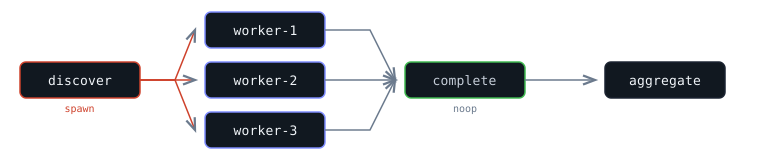
{
  "tasks": [
    {
      "id": "discover",
      "executor": "spawn",
      "config": { "command": "./list-targets.sh" },
      "spawn_output": ["complete"]
    },
    {
      "id": "aggregate",
      "executor": "shell",
      "config": { "command": "./aggregate.sh" },
      "depends_on": ["discover/complete"]
    }
  ]
}
Example: Multiple outputs
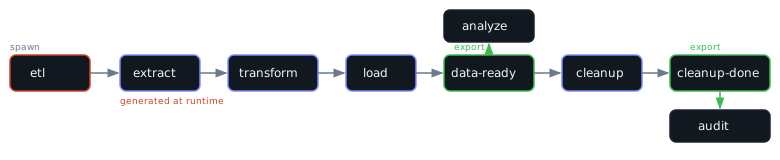
A spawn task can export multiple output IDs. Different downstream tasks depend on different outputs, letting you run work at different stages of the generated pipeline.
{
  "tasks": [
    {
      "id": "etl",
      "executor": "spawn",
      "config": { "command": "./generate-etl.sh" },
      "spawn_output": ["data-ready", "cleanup-done"]
    },
    {
      "id": "analyze",
      "executor": "shell",
      "config": { "command": "./analyze.sh" },
      "depends_on": ["etl/data-ready"]
    },
    {
      "id": "audit",
      "executor": "shell",
      "config": { "command": "./audit-cleanup.sh" },
      "depends_on": ["etl/cleanup-done"]
    }
  ]
}
The ./generate-etl.sh command outputs tasks including two milestones:
[
  { "id": "extract", "executor": "shell", "config": { "command": "./extract.sh" } },
  { "id": "transform", "executor": "shell", "config": { "command": "./transform.sh" }, "depends_on": ["extract"] },
  { "id": "load", "executor": "shell", "config": { "command": "./load.sh" }, "depends_on": ["transform"] },
  { "id": "data-ready", "executor": "noop", "depends_on": ["load"] },
  { "id": "cleanup", "executor": "shell", "config": { "command": "./cleanup.sh" }, "depends_on": ["data-ready"] },
  { "id": "cleanup-done", "executor": "noop", "depends_on": ["cleanup"] }
]
analyze starts as soon as data is loaded (after etl/data-ready), without waiting for cleanup. audit runs only after cleanup finishes (after etl/cleanup-done). The two downstream tasks run at different stages of the generated pipeline.
Trigger Executor
The trigger executor submits a new flow to a queue. It optionally waits for the child flow to complete, enabling sub-flow composition where one flow orchestrates others.
Configuration
| Field | Type | Required | Default | Description |
|---|---|---|---|---|
queue | string | Yes | - | Queue to submit the child flow to |
flow | FlowDef | Yes | - | Flow definition (static JSON or dynamic via ${tasks.*} interpolation) |
wait | boolean | No | true | Wait for child flow to complete. If false, returns immediately. |
Output
When wait is true (default), the task blocks until the child flow reaches a terminal state:
{
  "flow_id": "f_abc123",
  "queue_id": "deploy",
  "state": "succeeded",
  "task_count": 3,
  "tasks_succeeded": 3,
  "tasks_failed": 0
}
When wait is false, the task completes immediately after submitting the child flow:
{
  "flow_id": "f_abc123",
  "queue_id": "deploy",
  "async": true
}
Examples
Static flow — inline the child flow definition:
{
  "id": "deploy",
  "executor": "trigger",
  "config": {
    "queue": "deploy-queue",
    "flow": {
      "tasks": [
        { "id": "push", "executor": "shell", "config": { "command": "./deploy.sh" } },
        { "id": "verify", "executor": "http", "config": { "url": "https://health.example.com" }, "depends_on": ["push"] }
      ]
    }
  },
  "depends_on": ["build"]
}
Dynamic flow from upstream output — use variable substitution to pass an entire flow definition produced by an earlier task:
{
  "id": "run-plan",
  "executor": "trigger",
  "config": {
    "queue": "workers",
    "flow": "${tasks.plan.output.flow_def}"
  },
  "depends_on": ["plan"]
}
Fire-and-forget — submit the child flow and continue immediately without waiting for it to finish:
{
  "id": "notify",
  "executor": "trigger",
  "config": {
    "queue": "notifications",
    "flow": { "tasks": [{ "id": "send", "executor": "http", "config": { "url": "https://hooks.slack.com/services/T00/B00/xxx" } }] },
    "wait": false
  }
}
Notes
- The child flow runs on the target queue with that queue's concurrency, retry, and rate-limit settings.
- When
waitistrue, the trigger task fails if the child flow fails. - Cancel propagation: When a parent flow is cancelled (manually or via
fail_fast), all child flows spawned by trigger tasks are cancelled recursively. This prevents orphaned child flows from continuing to run after their parent is stopped. - Variable substitution in the
flowfield follows the same rules as other executor configs. When the entire value is a single${...}reference, type is preserved — so an upstream task can produce a complete FlowDef object.
Integration Executors
Integration executors let you call third-party APIs without writing code. You define an integration as a JSON file — specifying the API's base URL, authentication, and operations — and Tasked registers it as a named executor. Loading a file named github.json registers a github executor.
Loading Integrations
Pass a directory of integration JSON files at startup:
tasked-server serve --integrations-dir ./integrationsOr set the environment variable TASKED_INTEGRATIONS_DIR. Each .json file in the directory is parsed and registered as a named executor.
Definition Format
An integration definition describes an API service:
{
  "name": "github",
  "version": 1,
  "base_url": "https://api.github.com",
  "default_headers": {
    "Accept": "application/vnd.github.v3+json"
  },
  "auth": {
    "type": "bearer",
    "token_template": "${credential}"
  },
  "operations": {
    "list_issues": {
      "method": "GET",
      "path": "/repos/${params.owner}/${params.repo}/issues",
      "query": { "state": "${params.state}" }
    },
    "create_issue": {
      "method": "POST",
      "path": "/repos/${params.owner}/${params.repo}/issues",
      "body": {
        "title": "${params.title}",
        "body": "${params.body}"
      }
    }
  }
}| Field | Type | Required | Description |
|---|---|---|---|
name | string | Yes | Executor name (used for registration) |
version | number | No | Definition version (default: 1) |
base_url | string | Yes | API base URL |
default_headers | object | No | Headers sent with every request |
auth | object | No | Authentication strategy (see below) |
operations | object | Yes | Map of operation name to operation definition |
Authentication
The auth block defines how credentials are applied to requests. Templates like ${credential} are resolved from the task config's credential field.
| Type | Fields | Description |
|---|---|---|
bearer | token_template | Sets Authorization: Bearer <token> |
header | header, value_template | Sets a custom header |
query | param, value_template | Appends a query parameter |
basic | username_template, password_template | HTTP Basic authentication |
oauth2 | token_url, client_id_template, client_secret_template, refresh_token_template, scopes | OAuth2 with automatic token refresh and caching |
For JSON credentials (e.g., OAuth2 with multiple fields), use dotted paths: ${credential.client_id}.
OAuth2 automatically handles token refresh. The credential should be a JSON object with client_id, client_secret, and refresh_token. Tokens are cached in memory and optionally persisted to SQLite via --token-cache:
"auth": {
  "type": "oauth2",
  "token_url": "https://oauth2.googleapis.com/token",
  "client_id_template": "${credential.client_id}",
  "client_secret_template": "${credential.client_secret}",
  "refresh_token_template": "${credential.refresh_token}",
  "scopes": "openid email"
}
Enable token persistence with --token-cache ./tokens.db or TASKED_TOKEN_CACHE=./tokens.db. Without it, tokens are cached in memory only and re-fetched on server restart.
Operations
Each operation defines a single API endpoint:
| Field | Type | Required | Description |
|---|---|---|---|
method | string | Yes | HTTP method (GET, POST, PUT, PATCH, DELETE) |
path | string | Yes | URL path appended to base_url. Supports ${params.*}. |
query | object | No | Query parameters. Null values are omitted. |
headers | object | No | Additional headers for this operation |
body | any | No | Request body template (for POST/PUT/PATCH) |
pagination | object | No | Pagination strategy (see below) |
response | object | No | Response extraction config (see below) |
Pagination
Three pagination strategies are supported. All collect results from multiple pages into a single flat array.
Link header — follows RFC 8288 Link headers (used by GitHub, GitLab):
"pagination": { "type": "link_header", "max_pages": 10 }Cursor — reads a cursor from the response body and sends it as a query param (used by Slack, Stripe):
"pagination": {
  "type": "cursor",
  "param": "cursor",
  "response_path": "response_metadata.next_cursor",
  "max_pages": 10
}
Offset — increments an offset parameter by a fixed limit each page:
"pagination": {
  "type": "offset",
  "param": "offset",
  "limit_param": "limit",
  "limit": 100,
  "max_pages": 10
}
Paginated responses return a combined result:
{ "status": 200, "pages": 3, "body": [/* all items from all pages */] }Array responses are concatenated directly. Object responses with a single array field (e.g., {"items": [...], "total": 100}) have their array field extracted and concatenated. max_pages defaults to 10 if omitted.
Response Extraction
The response.extract field lets you pull specific fields from the API response using dot-separated JSON paths:
"response": {
  "extract": {
    "title": "title",
    "head_sha": "head.sha",
    "mergeable": "mergeable"
  }
}
If extract is configured, the output body contains only the extracted fields instead of the full response. Paths that don't resolve are omitted. Array indices are supported (e.g., "items.0.id").
Task Config
When using an integration executor, the task config is flat. The operation field selects which API operation to call. All other fields become parameters available as ${params.*} in the definition templates.
{
  "id": "list-issues",
  "executor": "github",
  "config": {
    "operation": "list_issues",
    "credential": "${secrets.GITHUB_TOKEN}",
    "owner": "myorg",
    "repo": "${tasks.clone.output.repo_name}",
    "state": "open"
  }
}| Reserved key | Description |
|---|---|
operation | Name of the operation to execute (required) |
credential | Credential value, typically from ${secrets.*} |
Interpolation
Integration executors use two-pass interpolation:
- Engine (first pass): Resolves
${tasks.*}and${secrets.*}in the task config. After this pass,credentialcontains the actual secret value and upstream task outputs are inlined. - Integration executor (second pass): Resolves
${params.*}and${credential}in the definition templates using the already-resolved config values.
Inline Definitions
For one-off API calls without a definition file, use the api executor with an inline definition:
{
  "id": "check-status",
  "executor": "api",
  "config": {
    "definition": {
      "name": "inline",
      "base_url": "https://api.example.com",
      "auth": { "type": "bearer", "token_template": "${credential}" },
      "operations": {
        "default": { "method": "GET", "path": "/status" }
      }
    },
    "operation": "default",
    "credential": "${secrets.API_TOKEN}"
  }
}
Remote Executor
The remote executor delegates task execution to an external HTTP service. This enables user-supplied executors written in any language — deploy a service that implements the protocol, and Tasked calls it.
Configuration
| Field | Type | Required | Default | Description |
|---|---|---|---|---|
url | string | Yes | - | URL of the remote executor service |
timeout_secs | number | No | task timeout | Per-request timeout |
headers | object | No | {} | Additional HTTP headers for the request |
Protocol
Tasked sends a POST request to the configured URL with the task context:
{
  "task_id": "my-task",
  "flow_id": "f_abc123",
  "executor_type": "remote",
  "config": { /* full task config */ },
  "input": { /* task input, if any */ }
}
The service must respond with a JSON object indicating success or failure:
// Success
{
  "status": "success",
  "output": { "result": "data" }
}

// Failure
{
  "status": "failed",
  "error": "something went wrong",
  "retryable": true
}
Example
{
  "id": "custom-transform",
  "executor": "remote",
  "config": {
    "url": "http://localhost:9090/execute",
    "timeout_secs": 30,
    "headers": { "Authorization": "Bearer ${secrets.SERVICE_KEY}" }
  },
  "input": { "data": "${tasks.fetch.output.body}" }
}
Notes
- The remote executor differs from the HTTP executor: it uses a standardized bidirectional protocol (task context in, structured result out) rather than being a raw HTTP client.
- Connection errors and timeouts are retryable. Non-2xx HTTP responses from the service are treated as errors (5xx retryable, 4xx not).
- The
retryablefield in the response lets the service control retry behavior for application-level failures.